Run your entire business from one window.
GoldStag One puts finance, inventory, orders, customers, staff and payroll in one Windows desktop app, with your data encrypted on your own computer.
Why GoldStag One Business software that stays yours
- No monthly subscriptionInstalls on your own computer. No recurring cloud fees.
- Your data stays privateNothing is uploaded. Everything is encrypted on your device.
- Works offlineKeep running the business without an internet connection.
See it in action
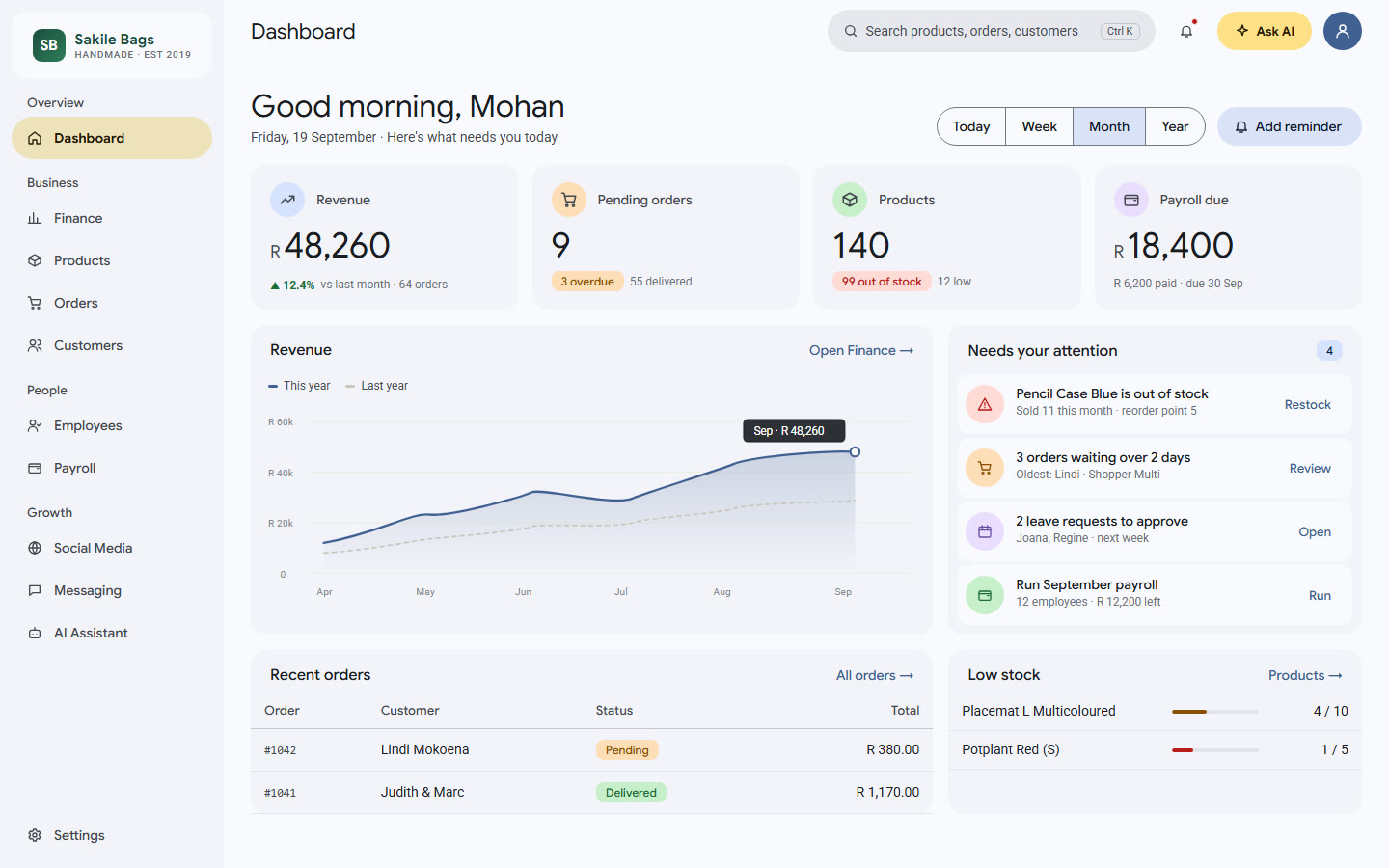
Pick your modules, and your whole business comes together on one dashboard
Running a business shouldn't mean juggling ten tools
Most small businesses end up with a patchwork of tools that don't talk to each other, cost more every month, and hold data they don't control.
Scattered spreadsheets
Stock in one file, orders in another, payroll in a notebook. Nobody has the full picture.
Subscriptions that add up
Every cloud tool charges per month, per user, forever.
Privacy worries
Your customer, staff and financial data sits on someone else's servers.
Everything your business needs, nothing uploaded
Pick only the modules you need during setup. Turn them on or off later. Hiding a module never deletes its data.
Dashboard
- Revenue, orders, customers and payroll due at a glance
- Revenue trend and order status charts
- Task reminders
Finance
- Upload Excel or CSV spreadsheets
- Automatic charts and summaries
- AI insights, plus edit raw data in a table
Inventory
- SKU, stock, cost and selling price, images
- Profit margin per product
- Low-stock and out-of-stock tracking
Orders
- Add manually or in bulk from Excel
- Track status, source, date and shipping
- Assign work and track progress
Customers (CRM)
- Contacts with email, phone and WhatsApp
- Groups and buying frequency
- AI suggestions for retention
Employees & Payroll
- Staff directory, availability and leave
- Salaries with allowances and deductions
- Bank and IFSC/SWIFT details
Messaging
- Bulk Email, WhatsApp and SMS
- Email via your own account (SMTP)
- SMS via Twilio
AI Assistant
- Built-in assistant, no API key needed
- Optionally connect Claude or ChatGPT
- "Ask AI" on every screen
Business profile & data
- 100+ currencies with live conversion
- Bulk import from Excel templates
- Export any screen to Excel
Also includes social media benchmark tracking (including TikTok).
Up and running in minutes
Import your existing Excel data and start from a dashboard that only shows what you chose.
Install
Download and install GoldStag One on your Windows computer.
Secure
Create your account and set up recovery: two security questions plus a one-time code.
Set up
Add your business details and logo, then choose your modules.
Work
Start from your dashboard. Next time, just log in and pick up where you left off.
Your business, organised. Your data, private.
There is no GoldStag server. Your business data never leaves your machine.
Runs locally
No server, no cloud. Business data is never uploaded anywhere.
Encrypted on your device
Data is encrypted with Windows' built-in encryption, tied to your Windows account.
Secure login
Passwords are never stored in readable form (scrypt hashing).
Lockout protection
Repeated wrong logins trigger a temporary lockout.
Account recovery
Reset a forgotten password with a recovery code or security questions.
You own your data
Export anything to Excel whenever you want.
Common questions
Which computers does it run on?
Windows desktop computers.
Where is my data stored?
On your own computer, encrypted. Nothing is uploaded to any server.
Does it need internet?
Not for everyday use. Internet is only needed for optional features: connecting Claude or ChatGPT, sending email or SMS, and live currency conversion.
Can I import my existing data?
Yes. Upload Excel files for products, orders, customers, employees and payroll using the bulk upload templates.
What if I forget my password?
Use your recovery code or answer your security questions to set a new password.
Can I choose which features I use?
Yes. Pick modules during setup and turn them on or off later in Settings.
Why does Windows show a warning when installing?
The installer is not yet code-signed, so Windows may show "Windows protected your PC". Click "More info", then "Run anyway".
Get GoldStag One
Email us and we'll send you the Windows installer and help you get set up.